

ElementSelector Pro is a free Autodesk® Revit® application that enables users to efficiently filter, preview, and select elements within various scopes such as an active view, a specific level, the current selection, or the entire project. This versatile tool allows users to narrow down their selections based on element category and parameter values. Furthermore, …
ElementSelector Pro offers several additional convenient features, including:
- seamless interaction with elements without the need to close the dialog.
- Optional category and parameter filters to refine the selection process.
- Support for filtering parameters based on all parameter types.
- The ability to simply click on a preview item (elementid) to zoom in and focus on the associated element.
DEMO & USAGE
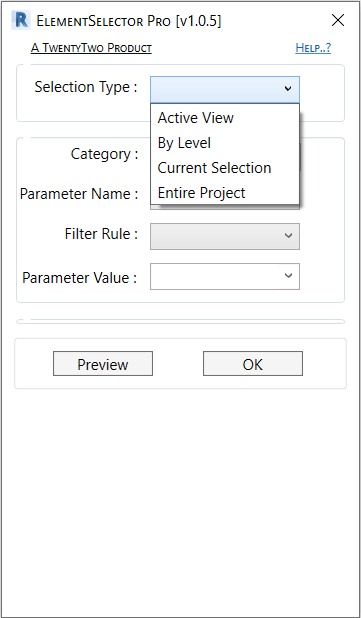
1. Select an item from the Selection Type dropdown (figure 1.0):
- Active View
- By Level
- Current Selection
- Entire Project
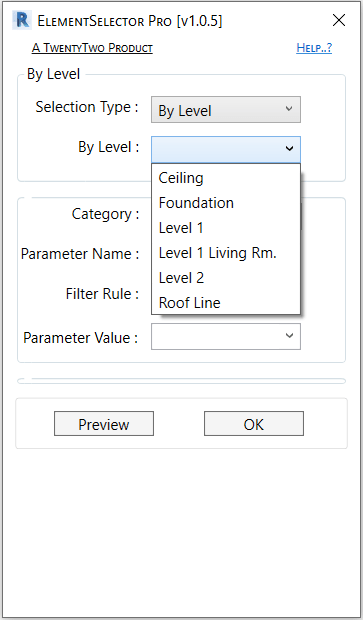
If the selection was “By Level”, another dropdown will display below to select a level (figure 1.1).
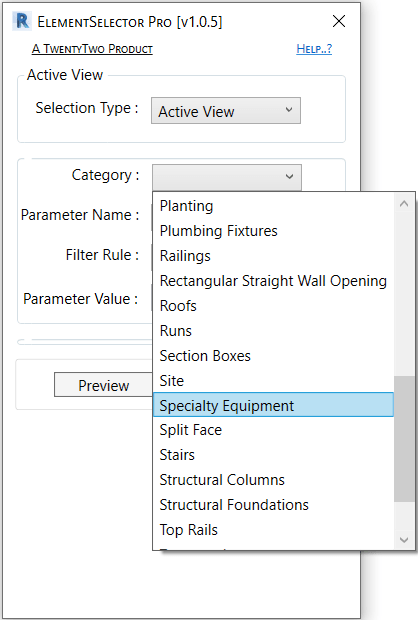
2. Select a category from the category dropdown which displays all the related categories from Selection Type value (figure 1.2).
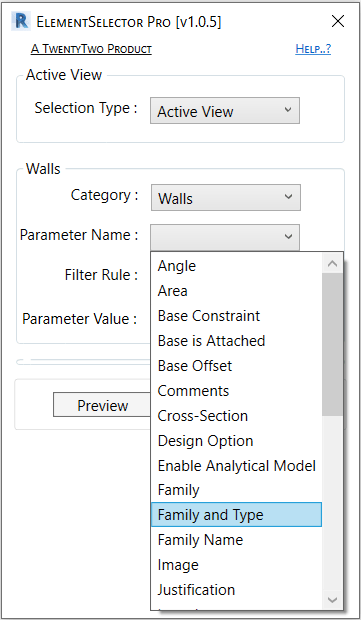
3. Select a parameter from the parameter name dropdown which displays all the related parameters from Category value (figure 1.3).
4. Select a parameter filter rule. Just for info, there are two types of filter rules : (1) one for the string type (figure 1.4) and (2) another type for ElementId, Integer and Double (figure 1.5). For the second type some rule such as: contains, does not contains, begins with, ends with … will not be included at all.
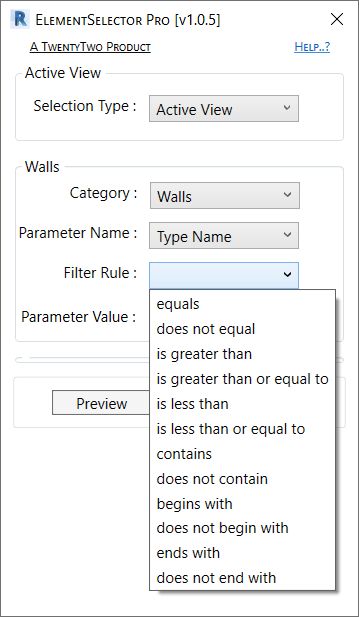

5. Select a parameter value from the parameter value dropdown which displays all the related parameter value from the elements (figure 1.6).

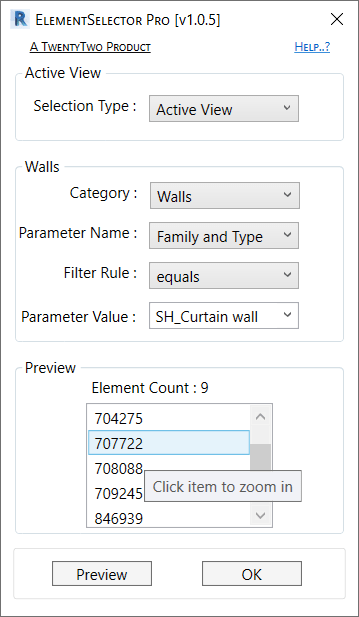
Click on “Preview” button to get the filtered elements and click on preview’s display item(ElementId) to zoom-in the element. <OR> Click “OK” to close the dialog and get the filtered elements selection.
(For Revit 2025) Autodesk App Store Download : https://apps.autodesk.com/RVT/en/Detail/Index?id=3135807245446499953&appLang=en&os=Win64
(For Revit 2024 to 2022 Versions) Installer Download : https://drive.google.com/file/d/1TXW4LZPHATV4vYNTgP11-YYYPknBJ-vi/view?usp=drive_link
(For Revit 2021 and Lower Versions) Autodesk App Store Download : https://apps.autodesk.com/RVT/en/Detail/Index?id=8786379510208969562&appLang=en&os=Win64
 TwentyTwo
will this be coming for 2025 soon?
LikeLike
Yes, very soon 😃
LikeLike
Thank You!
Respectfully,
Angela Caton
BIM/Layout Engineer
FCI Constructors, Inc.
4015 Coriolis Way
Frederick, CO 80504
P. (970) 535-4725 F. (970) 535-4867 C. (720) 357-7137
http://www.fciol.comhttp://www.fciol.com
[cid:FCIEMail-SMALL_34a1ff73-421b-42ef-a75e-fd660366689e.png]
Focused On Your Vision
LikeLike